There is a well-known asymmetry in real estate websites: visitors arrive with specific questions —about guarantees, neighborhoods, short-term rental conditions, maintenance fees, payment terms— and the website responds with a contact form or static content sections. The conversation gets deferred to an email, a phone call, hours or days of waiting.
This release corrects that asymmetry.
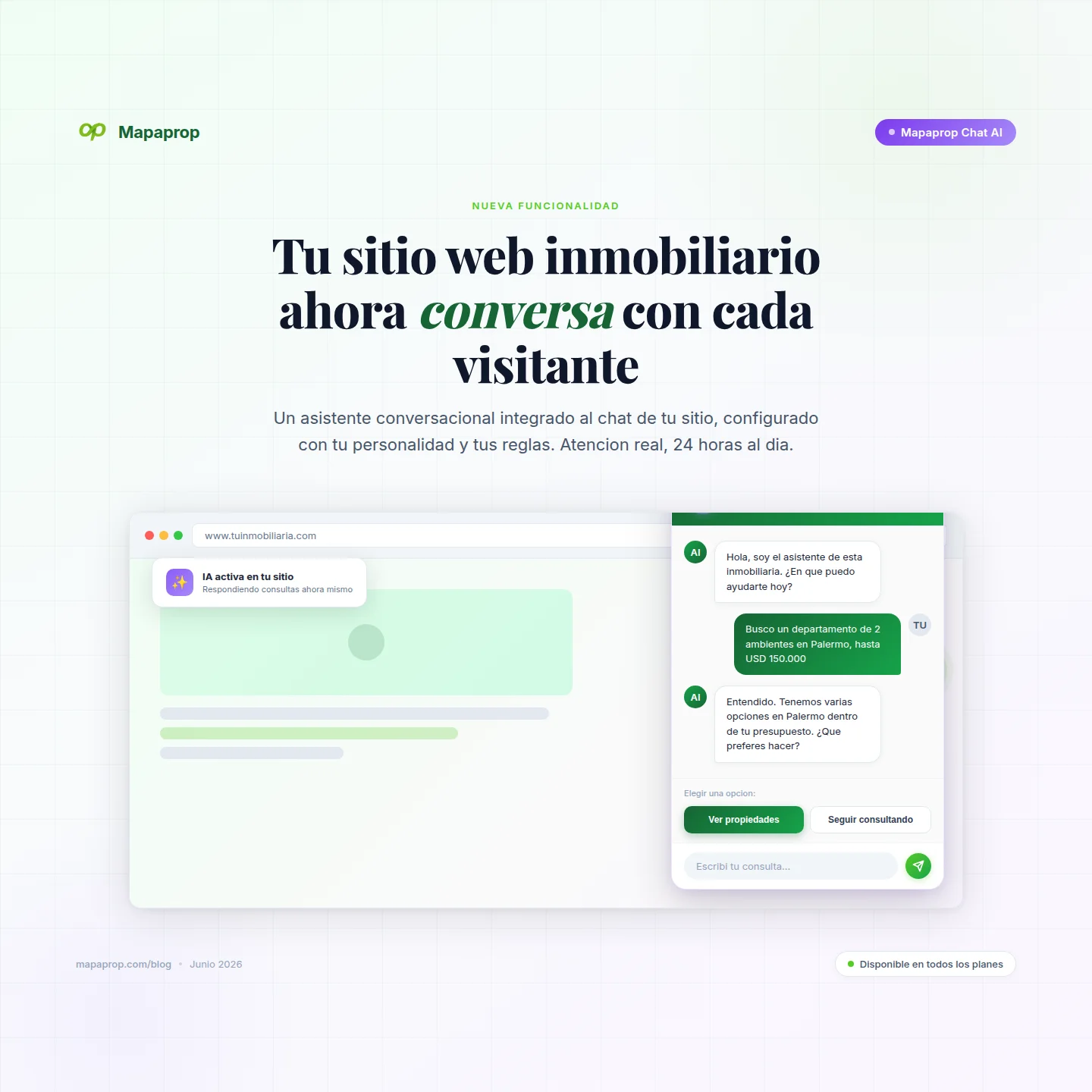
We are launching Mapaprop Chat AI: a conversational assistant integrated into your website chat, configured with the personality you define, the topics you choose, and the rules you set. It responds to visitor questions in real time with your voice, your tone, and your frame of reference. And when the visitor wants to move from general questions to specific properties, the chat takes them to the search engine automatically, without losing context.
The real estate website stops being a showcase with a contact form and becomes an active service channel, available twenty-four hours a day, with your identity.
The problem it solves
Traditional real estate chats operate at two extremes. On one side, they are rigid: pre-built questions, fixed answers, disguised forms. The real visitor never fits into the available options and ends up leaving. On the other side, they are too open: a generic AI that knows nothing about your agency, makes up data, offers guarantees you don't accept, recommends conditions that don't apply in your market.
Both extremes lose leads.
Mapaprop Chat AI resolves that tension by design: you define how it speaks, on which topics, with which rules. The assistant responds within that frame, with your voice, knowing your business.
How it works
When a visitor opens the chat on your website, they encounter two modes of use:
- 🔍 Search properties — the intelligent semantic search engine you've known since version 2.2.1.
- 💬 Ask AI (new) — open conversation with your configured assistant.
The search mode is unchanged. The new piece is the conversation mode: a parallel lane where the visitor can ask anything within the frame you define.
All assistant configuration lives in your Mapaprop panel, under Website > Chat AI, in a new tab called Free chat.
Your prompt: the assistant's personality
The first thing you configure is the custom prompt: a text where you describe who the AI is, how it introduces itself, what tone it uses, what it knows about your agency, what it should never say, how it closes conversations.
A few real examples:
- "You are Maria, an advisor at San Telmo Real Estate. You assist with a friendly but professional tone. You know the San Telmo, Monserrat, and Constitución areas in depth. When someone asks about rentals, always mention that we require a property guarantor or insurance bond. Never close a rental over chat — always redirect to an in-person visit."
- "You are the assistant for Punto Inmobiliario in Pilar. You speak in Argentine Spanish, using voseo. Your specialty is gated communities in the northern suburbs. If someone asks about a specific property that's not in the listing, suggest they use the search button."
- "You are the assistant for a boutique broker in Recoleta. You speak with refined vocabulary. We only work with properties above USD 300,000. If someone is searching below that range, thank them politely and redirect them with care."
Your prompt is not a welcome message: it is the complete definition of the character that will converse with your potential customer throughout the entire session. And it applies to every response.
Topics: the conversation frame
After the prompt, you define a list of enabled topics: the areas your assistant can talk about. Rental guarantees, neighborhoods, amenities, reservation deposits, maintenance fees and utilities, gated communities, closing paperwork — whichever ones apply to your agency and your market.
These topics serve two purposes. For the visitor, they appear in the chat as visible suggestions from the first message, indicating what they can ask about. For the assistant, they work as a reference frame: when someone asks something close to one of the topics, it responds with confidence; when someone asks something outside the frame (for example, "how much is a trip to Bariloche in July?"), the assistant politely redirects the conversation.
The rules you don't write but are still there
Underneath your prompt, Mapaprop automatically injects a layer of hard rules that protect both the customer and the business:
- Correct real estate terminology in the language of your market (Argentina, Mexico, Colombia, as applicable).
- Specific rules for rental guarantees in Argentina — the AI knows the legal framework and does not invent instruments that don't exist.
- Search derivation rules — the assistant knows when the visitor moves from a general question to specific properties, and offers to take them to the search engine with the criteria pre-loaded.
These rules apply after your prompt, which in practice means they take precedence. If your prompt says "recommend a promissory note as a guarantee" (and that is not valid in your jurisdiction), the system rules correct it. Your prompt defines the personality; our rules protect the conversation.
When a question turns into a search
This is the most important piece of the feature, and the one that defines how the product works.
The assistant does not talk about specific properties. It does not know your inventory, does not know what is available, does not invent units, does not suggest addresses. That restriction is deliberate: it is the only way to guarantee that the chat never invents data about properties that don't exist or are no longer available.
What it does instead is detect search intent and offer the transition to the search engine.
A typical conversation:
Visitor: Hi, I'm looking for a 3-bedroom apartment in Palermo.
Assistant: To show you specific properties that match what you're looking for, let me take you to the search engine with those criteria pre-loaded. Would you like to switch to the search, or would you rather keep asking about other topics?
Next to that response, two buttons appear:
- 🔍 Search properties
- 💬 Keep asking
If the visitor chooses to search, the chat switches to search mode with the criteria already loaded (3 bedrooms, Palermo) and shows the real inventory that matches. If they later need to clarify something else with the assistant, a persistent button takes them back to the free chat.
The visitor never loses the thread. They move from the general question to the real inventory in a single step, and return when they need to keep talking.
Why search is separate from chat
This separation between conversation (AI assistant) and inventory search (semantic search engine) is not an architectural detail: it is the technical guarantee that the system does not hallucinate properties.
The conversational chat operates on your prompt and the enabled topics. It is the layer where the AI can dialogue flexibly. But properties live in a second, completely distinct layer: a search engine with vector embeddings over Mapaprop's real inventory. That layer is not generative — it is deterministic: every property it returns is indexed, verified, and available.
When the visitor taps 🔍 Search properties, the query does not go through the chat's language model: it goes through the semantic search engine, which matches the visitor's intent against the vectors of your inventory and returns real results. Nothing made up. No fictional addresses. No properties that don't exist.
That is why the assistant, when it detects search intent, does not respond with properties — it offers the transition to the search engine. It is a design decision that separates what the AI can freely generate (conversation) from what it cannot invent under any circumstance (concrete inventory).
Real use cases
Here is what your customers are already asking the chat:
- "Which neighborhoods near your area should I consider if I have USD 80,000 to invest?"
- "What's the process if I pay cash and I'm from abroad?"
- "My salary is in pesos and I want to know if I can rent something from your portfolio."
- "What are the average maintenance fees for an apartment in Caballito today?"
- "Do you accept Provincia Seguros as a bond?"
- "I want a townhouse with a backyard in Boedo, do you have anything?" → the assistant offers to switch to the search engine with those filters pre-loaded.
Each of those conversations, until yesterday, ended in a form. Today it ends in a response — and often in a selected property.
Who can activate it and how
Mapaprop Chat AI is part of the Mapaprop AI package, available in Business Plan and above.
If you already have Mapaprop Chat AI active, you can access it directly from:
Settings > Website > Chat AI > "Free chat" tab
You'll find:
- A main switch to enable or disable conversation mode.
- The prompt field where you define the assistant's personality.
- The topic manager, where you edit the list of enabled areas.
- A preview showing how the public chat looks with your configuration.
- Validations that prevent half-finished setups: you cannot activate conversation mode without defining a prompt and at least one topic.
Tip. Start with a simple prompt and three to five topics. Test with real visitors. As you see what they ask, tune it. The prompt is not set in stone: it improves with use.
Complete documentation in the Help Center: Mapaprop Chat AI for your website.
If you don't yet have Mapaprop Chat AI active in your plan, you can add it from the plans page.
Try it live before activating
Before configuring your own, you can see Mapaprop Chat AI running in production on our demo site: https://express.mapaprop.com.
Open the chat in the corner, choose "💬 Ask AI", and ask anything that comes to mind. Try the transition to the search engine. Try switching back to conversation mode. You'll get a concrete sense of the experience your visitor will have once you activate it on your site.
Also in this version: custom labels for your contacts
Another improvement in this release for Pro+ and Business Plan customers: you can now create your own custom labels in the Contacts CRM.
The system labels you already knew —Tenant, Owner, Interested, Opportunity, To Meet, Frozen, Abandoned— remain available to all plans and all roles. The new piece is that in Pro+ and Business, you can add your own, with the name and color you choose, so the CRM speaks your commercial language.
- Pro+: up to 10 custom labels.
- Business: unlimited.
Only the main administrator and managers create and edit custom labels. Agents assign them to their contacts as always — very little changes for them, they simply have more options available.
Important note. If you ever downgrade from a plan with custom labels, they are not deleted: they remain hidden and reappear as they were when you return to Pro+ or Business. They are only removed permanently if you cancel the entire account.
Details in the Contacts CRM Help Center.
The paradigm shift
For years, the chat on a real estate website was a variation of the contact form: "leave your details and we'll call you". Today's visitor compares several agencies in the same session, asks specific questions, expects real-time answers.
Mapaprop Chat AI is not just another piece of technology. It is the concrete possibility of your website handling visitors with professional judgment at any hour, with your identity, your rules, and your inventory available. Initial setup takes twenty minutes. Fine-tuning happens with use, by observing what your real visitors actually ask.
From that configuration, the website stops being a showcase and becomes an active commercial channel.
Set it up. Test it with real visitors. Tune it.
And let us know how it goes.
The Mapaprop team and Ricardo Asensio.