There is a moment in the life of a lead that almost no real estate team handles well: the period between when the contact first arrived and when a decision was made. That interval has a name: the commercial process. And in most teams, that process lives scattered across WhatsApp messages, paper notes, mental reminders, and desktop folders.
The result is predictable: leads that went cold without anyone noticing, opportunities lost in the noise of the day, and the constant feeling that something is slipping through the cracks.
This release changes that.
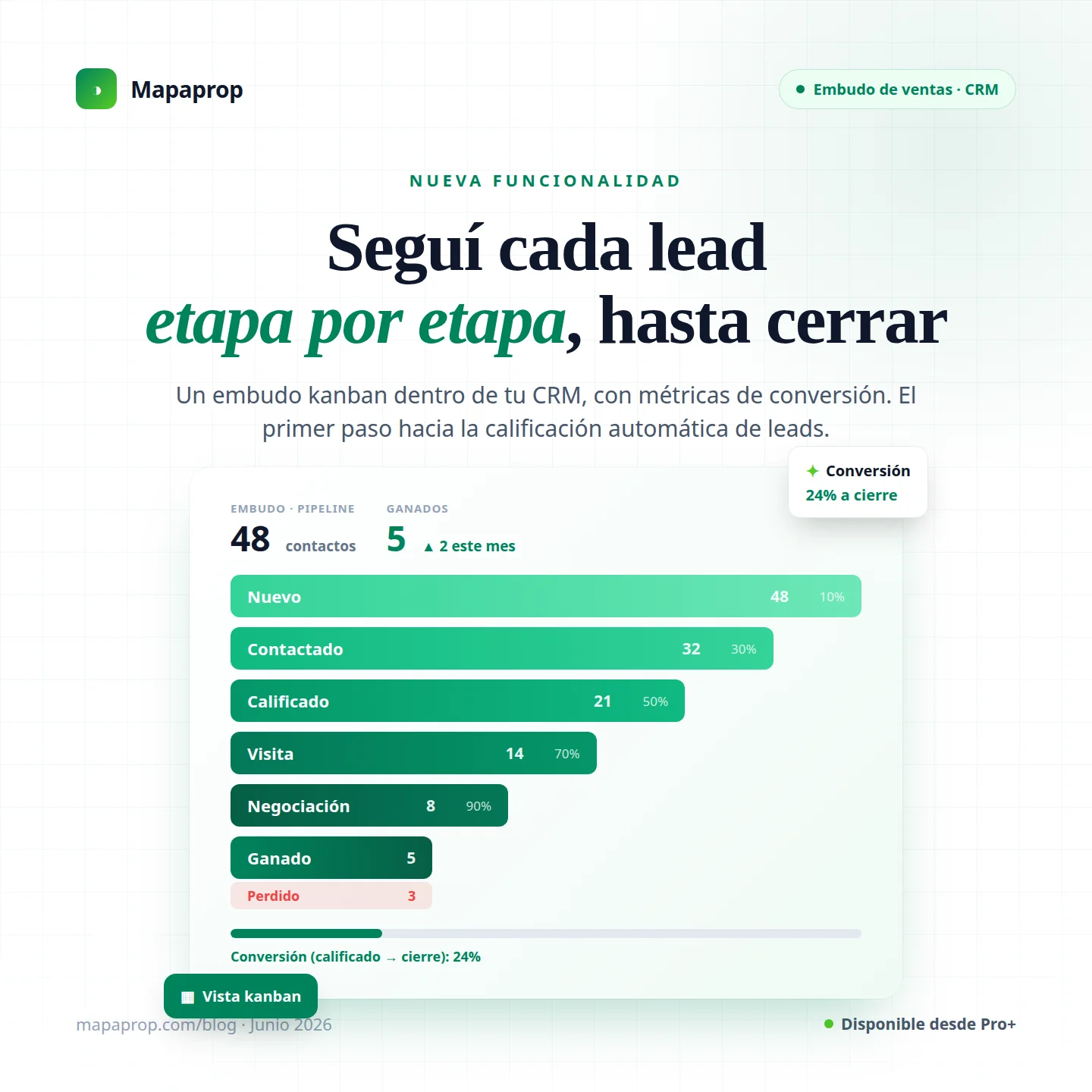
We are launching the Sales Pipeline inside the Mapaprop CRM: a kanban-style pipeline where every contact holds its place in the commercial process, moves stage by stage, and generates metrics that show you precisely where deals close and where they are lost.
And most importantly: this pipeline is not just a tracking tool. It is the first building block of something larger.
How the pipeline works
The pipeline has seven stages that reflect the real estate commercial cycle as it actually happens in practice:
New → Contacted → Qualified → Visit → Negotiation → Won / Lost
Every contact you add to the pipeline occupies exactly one position in these stages. You drag the card from one column to the next when they advance. If a deal fell through, move it to Lost. If it closed, move it to Won.
The kanban view gives you, at a glance, the complete state of your process: how many contacts are in each stage, who they are, and how long they have been there.
Conversion metrics and funnel view
Beyond the kanban board, the pipeline includes a metrics view that shows:
- Stage-to-stage conversion rate: what percentage of contacts that reach Contacted advance to Qualified, and so on at each step.
- Average time per stage: how many days a contact typically takes to move from one column to the next.
- Funnel view: the classic visualization showing graphically where volume is lost at each stage.
These numbers are not decorative. If the conversion rate between Qualified and Visit is 20%, you know that is where the bottleneck is. If the average time in Negotiation is four weeks, you know that stretch needs attention.
Lead detail: timeline and notes
Every contact in the pipeline has its own detail view: a timeline showing the complete history of stage movements (with dates and duration at each stage) and a notes area where the agent records the follow-up.
The timeline is not editable — it reflects exactly what happened and when. The notes are: they are the agent's working space.
Add a contact to the pipeline from the Inbox
The friction in traditional tracking systems is in the entry: for a lead to enter the pipeline, multiple steps are required — find the contact, open another screen, assign a stage.
In Mapaprop, the flow is different. When you receive a message from a contact in the Inbox, you can add them to the pipeline directly from there, in a single step, without leaving the conversation. The starting stage is New by default, but you can choose where to begin.
You can also find the contact from the Contacts section and add them from there. In both cases, the process is one: you select the contact, place them in the pipeline, and they appear in the kanban ready to be managed.
Filters by branch and agent
For office administrators and managers, the pipeline includes visibility controls:
- "Mine / My office" toggle: switch between seeing only your own active leads in the pipeline or seeing the complete office pipeline.
- Agent filter: in the office view, you can filter the kanban by specific agent.
This allows managers to have a full overview of the team's commercial process without losing the per-person detail.
Vendor isolation is part of the design: each agent sees and manages only their own contacts. There is no cross-contamination between portfolios or access to other agents' leads within the same team.
Plans: who can use it
The use of the sales pipeline is available from Pro+ Plan.
In Pro+ and Business, the pipeline works with the seven canonical stages: New, Contacted, Qualified, Visit, Negotiation, Won, Lost. These names reflect the closing probability of each moment in the process and are a standard real estate commercial reference.
Stage customization — renaming them so they speak your team's commercial language — is exclusive to the Business Plan. You can call "Prospect" what the system calls "New", or "Proposal sent" instead of "Negotiation". The closing probability percentage associated with each stage is an internal axis that does not change; what is customized is the visible name.
If your team works with a specific commercial process — stage names your people already use and recognize — Business gives you that adaptability.
This is just the beginning: toward automatic lead qualification
This is the part we most want to share, and the one that matters most to understand before deciding how to use the pipeline.
Today, all movement in the pipeline is manual. The agent decides when a contact advanced and drags the card. There are no automatic rules, no action triggers, no qualification that happens on its own.
But that structure of stages with closing probabilities is not arbitrary. It is exactly the foundation on which Mapaprop will build automatic lead qualification and follow-up in future versions.
What does that mean in practice? That the system will be able to, in time:
- Detect that a lead received three messages without a reply and notify the agent.
- Automatically suggest the stage a contact should be in based on their behavior.
- Escalate alerts when a lead has been in a stage too long without movement.
- Trigger follow-up actions (reminders, messages) based on the current stage.
None of that exists yet. We are not promising dates or specific features, because the roadmap is shaped by real usage data. But the structure we are launching today is the right architecture to build it on.
Every time you move a contact from one stage to the next, you are feeding the information system that will make that automation possible. Today's pipeline is building block zero of the intelligent CRM to come.
How to get started
If you are on Pro+ or Business plan, the pipeline is already available in your panel:
CRM > Contacts > Pipeline
The first step is adding your first contacts. You can do it from the Inbox, from the Contacts list, or by searching directly inside the pipeline. No prior configuration is needed: the stages are already defined and ready.
If you want to customize stage names (Business Plan), the configuration is at:
Settings > CRM > Pipeline stages
Start with the most active leads you have today. Assign them a stage. Look at the kanban. You will see in minutes what changes when your commercial process has a visible home.
The process that was always there, now visible
The sales pipeline does not invent a process that did not exist. The lifecycle of a real estate lead — from first contact to close or loss — has always been there. What changes is that it now has a concrete place to live, be measured, and be managed.
That alone transforms how a real estate sales team works.
And it is only the beginning.
The Mapaprop team and Ricardo Asensio.